 Release Info
 Downloads
 Documentation
 Support
 Partners
 User Forum


Moving a PxPlus License to a new system
The following steps are required to move your registered PxPlus license to a new machine when necessary. Before you start, make sure you have the Serial Number and Activation Key for your license so you can install it on the new system.
- Submit a helpdesk ticket at http://helpdesk.pvxplus.com
and indicate the PxPlus product serial number that you
wish to move to a new system. Once we receive and verify
the request, we will validate and initiate the process on
our key registration system and contact you when you may
proceed with the transfer.
- On the system you are de-installing PxPlus, run the
Online Registration by one of the following methods:
a. Running the online registration program: "*plus/reg/net"
b. Running the online registration in the Utilities section of the Menu bar from the PxPlus command line prompt on Windows.
c. Running the Register Online shortcut provided in a Windows 'Start Button' shortcuts
d. Running the Register Online from the PxPlus IDE
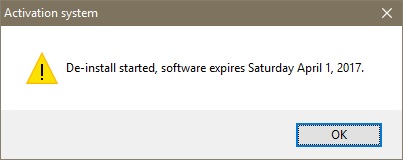
- This should result in a message box similar to the one
below. Take note of the expiry date, as the software on
the current system will terminate on that date.
- Install PxPlus on the new system and enter the Activation
Key.
- On the new system, launch PxPlus and you should receive a
message similar to the one below.
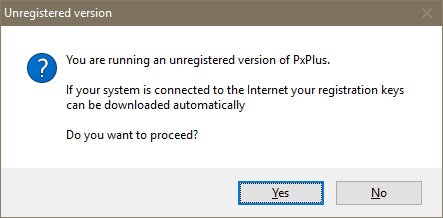
Select "Yes"
- You will be asked to confirm you wish to register the
software.
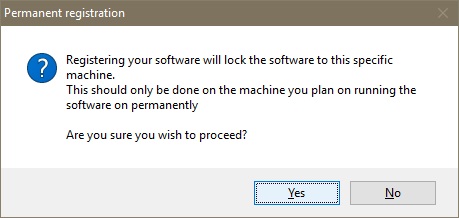
Again select "Yes"
- Next you should receive the following message:
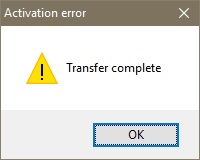
This message will signify that the transfer of the PxPlus registration is complete.
IMPORTANT NOTICE:
The above process will ONLY transfer your PxPlus license. It will not transfer your application programs and/or files. You will need to do these separately.
| Note: All message boxes shown above are, as they will appear on Windows. On text mode systems, a comparable text message will be displayed. In addition, some message boxes may display with a title of "Activation Error" as opposed to "Activation System" (PxPlus 2016 and earlier). The display does not indicate an error but is merely a common title used by the registration system. |
